Why Does Your Budget Template Feel Like A Full-Time Accounting Job? And How To Fix It

Updated on by BudgetOnGrid
Quick answer
Budgeting starts feeling like a full-time accounting job when there is too much work involved in keeping everything updated. Recording transactions, sorting purchases into categories, fixing spreadsheet formulas, checking totals and preparing another month's budget can take hours. A simpler budget, a consistent routine, and a better way to handle transactions can make the process much easier.
Downloading a budget template usually starts with the goal of getting finances organized. It already has the income section, expense categories, savings tracker and charts. All the formulas are there, and everything looks ready to go.
Then the actual work starts.
The bank statement needs sorting. Some expenses don't fit the categories. A formula stops calculating properly after adding another row. There are transactions from two different accounts to go through, and the new month needs its own sheet.
What was supposed to be a simple budgeting routine is now taking an entire evening.
And it's not just spreadsheet users. People using budgeting apps also complain about spending too much time correcting categories, fixing bank connections and keeping up with every transaction.
Budgeting is important, but it shouldn't feel like another part-time job. So what makes it so much work, and what can make it easier?
Image: Trying to keep a budget updated can become frustrating when there are too many things to do.
Why Does Budgeting Take So Much Time?
There are a few common reasons. Some come from the way the budget is arranged, while others come from the work involved in keeping track of everyday spending.
1. Every Purchase Needs to Be Recorded
A grocery trip, lunch, fuel, subscriptions, electricity and all the little purchases in between. They add up, and somehow they all need to find their way into the budget.
For someone using a spreadsheet, that might mean opening a bank statement, finding each transaction and adding it to the correct row.
Budgeting apps can pull transactions in automatically, but that doesn't mean the work always ends there. Some transactions arrive late, some are placed in the wrong category, and others need correcting.
The bigger the number of transactions, the more noticeable this becomes.
Some people enjoy recording purchases because it keeps them aware of what is being spent. Others don't want to spend their evenings entering dozens of transactions.
Neither approach is wrong. The important thing is finding a way to keep the budget updated without making the process unbearable.
2. Bank Statements Don't Always Fit the Budget
A downloaded bank statement might look fine when opened in Excel, but that doesn't mean it's ready to use in a budgeting template.
The columns may be arranged differently. Dates might use another format. Money coming in and going out could appear in separate columns, while the template expects one amount column.
And then there are PDF statements, which often need to be converted or processed before the information can be used.
Some people try to fix this with VLOOKUP, Power Query or PivotTables. Those tools can be useful, but they also come with a learning curve.
A person who just wants to know how much went to groceries this month shouldn't have to spend two weeks learning Excel before getting there.
3. Sorting Expenses Into Categories Takes More Work Than Expected
The bank statement says a payment was made to a particular merchant. The budget, however, has categories such as Groceries, Transport, Bills and Personal Spending.
Now someone has to decide where that transaction belongs.
It gets even more confusing when the same shop sells different things, or when one purchase includes groceries and household items.
Automatic categorization helps, but it doesn't always get everything right. Some purchases still need to be checked or moved.
This is one reason people sometimes prefer manual categorization. It gives them a chance to see what is being spent.
But having to make the same decisions for every transaction, every month, can get tiring.
4. The Budget Has Too Many Categories and Too Much Detail
There are budget templates with separate sections for almost everything: groceries, dining out, coffee, snacks, toiletries, household supplies, clothing, entertainment and several types of savings.
Some people genuinely need that level of detail. Others end up with categories they barely use.
Detailed budgeting can also become demanding when every dollar needs to be assigned, every purchase recorded, and every category reviewed regularly.
For someone who enjoys managing money this way, that might be perfectly fine.
But someone who simply wants to cover the bills, keep spending under control and know what's left may find the whole setup unnecessarily complicated.
5. One Change Can Turn Into Another Spreadsheet Problem
This is particularly common with Excel and Google Sheets budgets.
A template might work perfectly until a new category is added, a row is inserted or a formula is accidentally overwritten.
Some people buy ready-made templates because they aren't comfortable building formulas themselves. Others spend weeks creating their own workbook and end up relying on tutorials to make everything work.
The problem isn't necessarily that the spreadsheet is badly designed. It's that changing and maintaining it can require more spreadsheet knowledge than expected.
Adding a new expense shouldn't mean checking five other formulas to make sure nothing has broken.
6. Every Month Comes With Another Round of Updates
Most budgets are built around monthly income and expenses, but actual spending doesn't always follow the same pattern.
Electricity bills change. Some subscriptions are paid annually. Car insurance might be due every six months. There could be a dentist appointment, a holiday or an unexpected repair.
A budget that assumes everything stays the same can be difficult to keep accurate.
Then there is the preparation for another month. Some people duplicate their previous worksheet, clear the old transactions, carry over the planned amounts and update account balances.
Others use budgeting apps that handle some of this automatically.
Either way, the new month brings its own adjustments.
7. Budgeting Apps Can Bring Their Own Problems
Moving away from spreadsheets doesn't automatically solve everything.
Automatic bank syncing is convenient, but it isn't for everyone.
Some people don't like connecting financial accounts to another service. Others have experienced disconnected bank links, incorrect categories or transactions that need checking anyway.
Then there is the subscription. Paying every month or year for a budgeting app can feel unnecessary, especially when the main requirement is simply keeping track of income and expenses.
Some people also dislike having financial records tied to a service they cannot fully control.
A budgeting app can be a great choice, but the convenience has to be worth the cost and the trade-offs.
How to Make Budgeting Less of a Chore
The aim isn't to remove every bit of manual work or turn budgeting into something that runs entirely on its own. Some people like being involved in the process.
The aim is to remove the unnecessary work.
1. Start With a Budget That Can Actually Be Kept Up With
A budget doesn't need 40 categories to be useful.
Start with the main things that matter: bills, food, transport, savings, debt and personal spending.
Additional categories can be added when there is a real reason for them.
The same applies to the budgeting method. Zero-based budgeting works well for people who like assigning every dollar, but it isn't the only way to organize money.
A simpler monthly cashflow budget may be enough for someone who mainly wants to know what's coming in, what's going out and what's left.
2. Don't Force Daily Transaction Updates
Some people like entering purchases immediately. Others prefer checking a bank statement once or twice a week.
There isn't one schedule that works for everyone.
A regular check-in around payday, every weekend or twice a month can work just as well, depending on how often income and expenses come in.
The important thing is not leaving so much behind that updating the budget becomes a long catch-up session.
3. Make Recurring Expenses Easier to Recognize
Rent, subscriptions, internet bills, insurance and other regular payments usually appear every month or at predictable intervals.
Keep their amounts and categories handy.
Some budgeting tools have rules that automatically assign regular transactions to the right category. In Excel, dropdown lists and lookup formulas can also help.
This saves repeated work, although unfamiliar purchases and transactions that don't fit neatly into one category will still need a closer look.
4. Don't Build Every Month From Scratch
If the income sources, bills and categories are mostly the same, there is no reason to recreate everything.
Keep the existing structure, carry forward the planned amounts and change what is different.
In Excel, this can mean copying the previous month's worksheet. In a budgeting app, there may be a recurring budget or monthly rollover feature.
Just make sure the previous month's actual spending doesn't accidentally carry into the new month.
5. Don't Spend Hours Learning Unnecessary Tools
VLOOKUP, PivotTables, Power Query and complicated formulas can make spreadsheets powerful.
But not everyone needs to learn all of them to manage a personal budget.
A simple template that calculates income and expenses correctly may be all that's needed.
When the same task requires another tutorial every time a change is made, it may be worth looking at a tool that already handles those calculations.
6. Make the Numbers Easier to Read
A budget should answer a few basic questions without requiring a lot of calculations:
- How much income came in?
- How much has been spent?
- Which categories are going over budget?
- How much is left?
Charts, category totals and simple spending indicators can help.
There is no need to build a complicated dashboard just to answer those questions. The numbers should be easy to find and understand.
What Are the Options When Budgeting Still Feels Like Too Much Work?
Sometimes a better routine is enough. Other times, the current tool is responsible for much of the frustration.
Here are the common options and what comes with each.
| Option | What it offers | What still needs doing |
|---|---|---|
| Excel or Google Sheets | Full control over categories, layout and calculations | Maintaining formulas, arranging transactions and checking totals |
| Ready-made budget template | A prepared layout, formulas and sometimes charts | Adding actual transactions, adjusting the budget and keeping it updated |
| Budgeting app with bank sync | Automatic transaction imports and built-in reports | Checking categories, maintaining connections and paying for the service |
| BudgetOnGrid | Customizable budgeting tables, automatic calculations and optional statement imports | Reviewing imported transactions and updating the budget when needed |
There is also a middle ground between entering everything into a spreadsheet and connecting a bank account to a budgeting app.
An Option Worth Considering: BudgetOnGrid
BudgetOnGrid is a web-based budgeting tool with a spreadsheet-style workspace.
It is built for people who like organizing money in tables but don't want to maintain spreadsheet formulas or spend time rebuilding a budget every month.
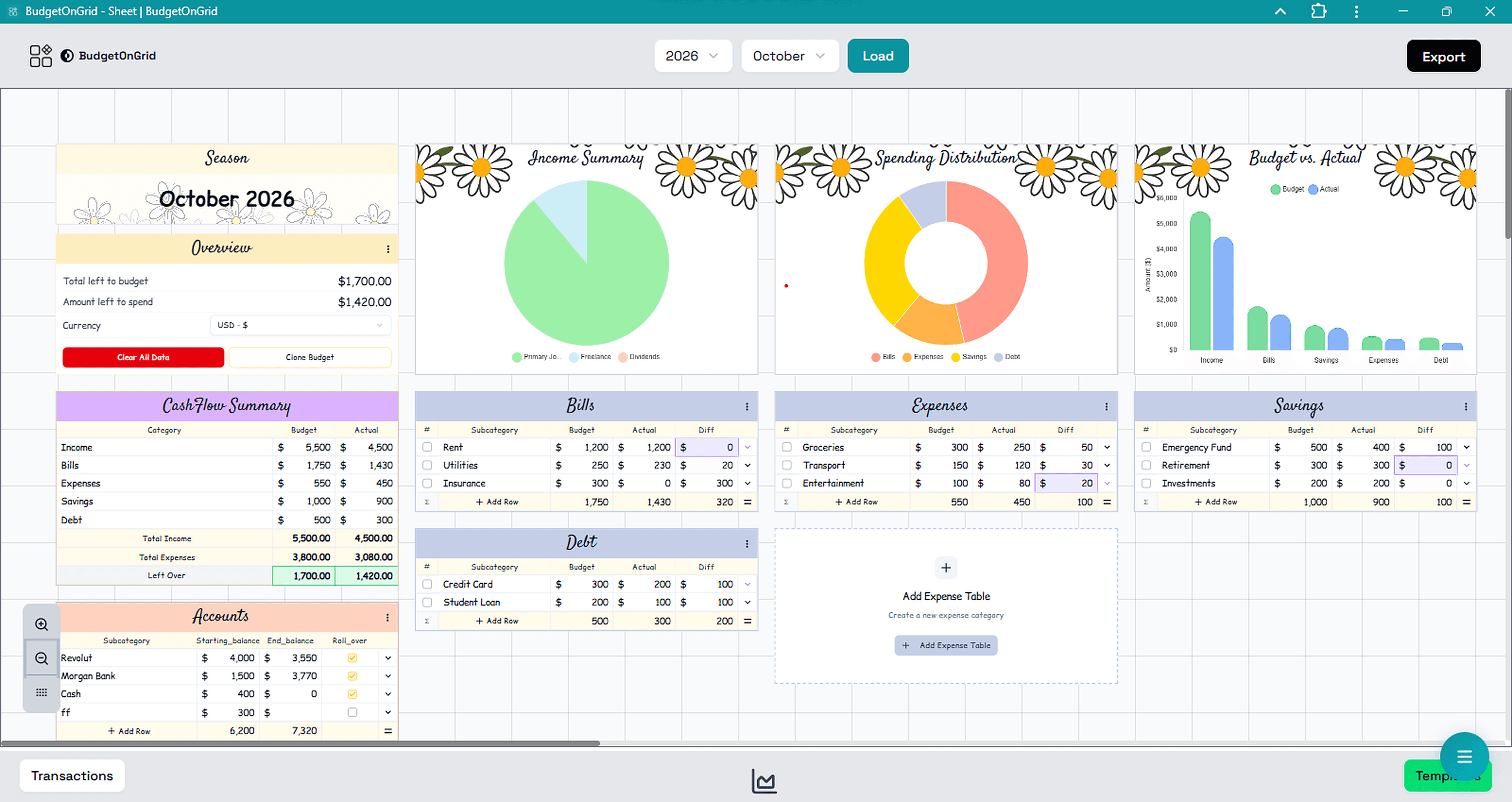
Image: BudgetOnGrid's budgeting workspace with income, expense categories and summaries.
Organize the Budget Around Custom Categories
Income, expenses and accounts are arranged in tables. Expense tables can be created for Bills, Food, Savings, Debt or whatever groups make sense for the budget.
Each table can have its own subcategories and planned amounts.
The Actual amounts update as transactions are recorded, and the Cashflow Summary brings income, expenses and the remaining amount together.
There are no formulas to write or copy when another row or category is added.
For a closer look at setting up this structure, learn how to build a budgeting template with BudgetOnGrid.
Update Transactions Without Typing Everything
Some people prefer entering purchases themselves. That's still an option in BudgetOnGrid.
For anyone dealing with a long bank statement, there is also an import feature. PDF, CSV and Excel bank statements can be uploaded, along with receipts.
The extracted transaction information is placed directly in the transactions list. Categorization rules can also help with regular merchants and bills.
To see how the import process saves time, explore how to track expenses or transactions with BudgetOnGrid.
Video: Importing bank transaction information from a downloaded statement.
There is no bank linking. Statements are downloaded and uploaded whenever needed, without providing bank login details.
No Formulas to Maintain
The calculations happen automatically in BudgetOnGrid.
Adding an expense category, creating another subcategory or recording a transaction doesn't require adjusting spreadsheet formulas.
The budget totals and account balances update as the information is added.
Keep the Same Budget From Month to Month
BudgetOnGrid has a Clone Budget option.
It copies categories, subcategories and planned amounts from a previous month. Actual amounts reset for the new month, and accounts with Roll Over enabled carry their remaining funds forward automatically.
This avoids creating the same budget structure again every month.
To learn more about this workflow, read how to copy or clone a budget from the previous month with BudgetOnGrid.
See Where the Money Is Going
The Cashflow Summary shows planned and actual income and expenses. Charts show how income and spending are distributed and compare budget amounts with actual amounts.
There are also spending indicators that change cell colors when a category reaches a chosen threshold.
For example, a category can change color when actual spending reaches 70% of its planned amount.
Continue Working With Excel
BudgetOnGrid supports Excel and CSV exports.
The downloaded budget can be opened in Excel for further work, or its data can be used alongside an existing workbook.
A custom Excel template may need some rearranging to fit the exported information, especially when it has its own formulas, charts or PivotTables.
If exporting is important, learn how to export budget data with BudgetOnGrid.
Budget Records Stay on the Device
BudgetOnGrid stores budget records locally on the device.
When a bank statement or receipt is uploaded, it is routed securely through a built-in statement and receipt parser. The uploaded file and raw financial data are immediately discarded and not retained on BudgetOnGrid's servers afterwards.
There is no bank linking and no need to provide bank login credentials.
If avoiding bank linking is a priority, explore other best budgeting apps without linking a bank account.
There are a few trade-offs. Budget records do not automatically sync between devices, and clearing browser data can remove locally stored records. Regular Excel or CSV backups are important.
BudgetOnGrid may not suit someone who wants automatic daily bank syncing or a budget that stays live across multiple devices.
But for someone who wants custom categories, automatic calculations, optional transaction imports and an Excel export without maintaining formulas, it offers another way to manage a budget.
Spend less time keeping the budget updated
Get the familiar layout of a spreadsheet without the fragile formulas and manual typing. Organize categories, upload statements, and keep data private.
Explore BudgetOnGridFrequently Asked Questions
Why does budgeting take so much time?
The time often goes into tasks around the budget itself: recording transactions, sorting purchases into categories, checking totals, adjusting expense amounts and preparing the next month. The more detailed the system, the more work it can require.
Do I have to record every transaction to have a useful budget?
Not necessarily. Some people prefer recording every purchase, while others mainly track their regular bills, major spending categories and savings. The level of detail depends on what the budget needs to show.
Is zero-based budgeting too complicated?
It works well for people who want to assign every dollar a purpose and keep close track of each category. However, recording and reviewing every transaction can become tiring for people who prefer a simpler way to manage their money.
Can budgeting apps still require manual work?
Yes. Automatic bank syncing can bring transactions into an app, but some still need correcting or categorizing. Bank syncing can also disconnect, and some transactions may arrive late or be missed.
How often should I update my budget?
There is no fixed schedule. Some people update transactions daily, others once or twice a week, and some prefer payday or monthly reviews. A routine that is easy to maintain is more useful than one that constantly gets postponed.
Can I manage my budget without connecting my bank account?
Yes. Transactions can be entered manually or imported from downloaded bank statements, depending on the tool. BudgetOnGrid supports PDF, CSV and Excel statement imports without requiring bank linking or syncing.
What is BudgetOnGrid?
BudgetOnGrid is a web-based budgeting tool with a spreadsheet-style workspace. It has customizable income and expense tables, automatic calculations, bank statement and receipt imports, categorization rules, monthly budget cloning and Excel or CSV exports.